
Master the lost art of beautiful cursive.
Cursive 4.0 introduces Personal Signature Practice (typed styles and photo underlay tracing), the Letter Home deck on French Seyès guidelines, opposing slide-out panels, and an overhauled low-latency PencilKit canvas with graceful rejection reset for iPhone, iPad, and Mac.
Personal Signature Studio
Develop, refine, and master your signature with confidence. Choose between typed cursive font previews or import and trace your own handwritten signature over authentic French Seyès guidelines.
Typed Name Signature
Type your full name or initials to preview them in all 6 included cursive handwriting styles. Follow the animated loops and develop a signature with balanced rhythm and elegant flourishes.
- Instant previews across 6 authentic cursive font models
- Stroke-by-stroke guidance, loop tracking, and repetition targets
- Monoline ink with sub-pixel Spencerian slant alignment
Photo & Camera Underlay Trace
Capture a photo of your existing paper signature or import from Photos. Calibrate size, opacity, and horizontal/vertical alignment against Seyès lines, then trace it to build motor memory.
- Live camera capture (iOS/iPadOS), PhotosPicker, and Mac file import
- Adjustable opacity, sizing scale, and horizontal/vertical positioning
- Unscored muscle memory mode—practice freely without artificial grading
Engineered for Deep Muscle Memory
Lessons, bookmarks, and signature exercises all launch into the same focused PencilKit canvas—with low latency, monoline ink, and automatic rejection reset.
One Writing Stage
Every activity opens in the exact same clean, measured stage. Follow the model, check your strokes, and advance smoothly when repetition goals are met.
- Consistent distraction-free writing paper across all features
- Fixed character geometry that never jumps or resizes during practice
- Configurable letter scaling from 35% to 200% (default 65%)
Inline Shape Replay & Coaching
Animated demonstrations show starting points and stroke flow in a reserved lane below the paper, keeping the canvas stable and focused.
- Step-by-step playback with previous, pause, replay, and next controls
- Directional numbered arrows and stroke sequence guidance
- Dedicated coaching lane that never shifts the paper vertically
Monoline Canvas & Rulings
Direct low-latency PencilKit inking for Apple Pencil, touch, or Mac trackpad with authentic French Seyès lines and 52° Spencerian slant guides.
- French Seyès 4-line ruling and 52° Spencerian slant lines
- Uniform monoline stroke without requiring pressure calibration
- Instant Undo, Erase, and native UIKit backing layer optimization
Graceful Rejection Reset
Unsuccessful attempts fade out with a subtle smoke puff and clear the canvas automatically—allowing instant retry without manual erase fatigue.
- Automatic ink fade and undo clear on below-threshold attempts
- Coaching hints appear upon rejection and auto-dismiss on success
- Continuous repetitions keep your hand moving in a steady practice flow
Designed for Focused Handwriting
Explore the unified practice canvas, stroke animations, structured library, and multi-device sync across iPhone, iPad, and Mac.
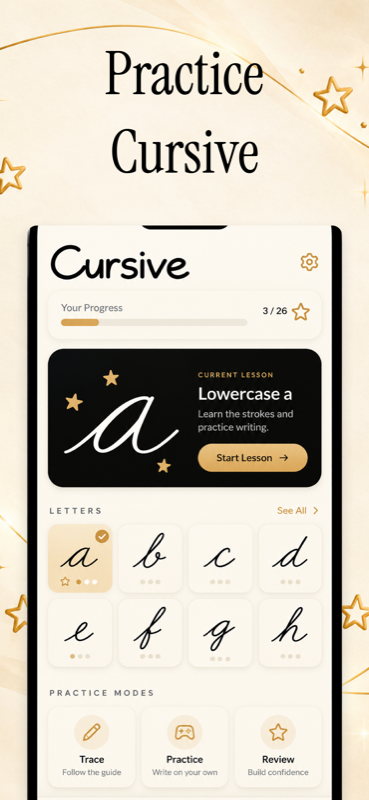
Practice Cursive
One dedicated tracing screen with real-time feedback, Seyès ruling, and repetition counters.
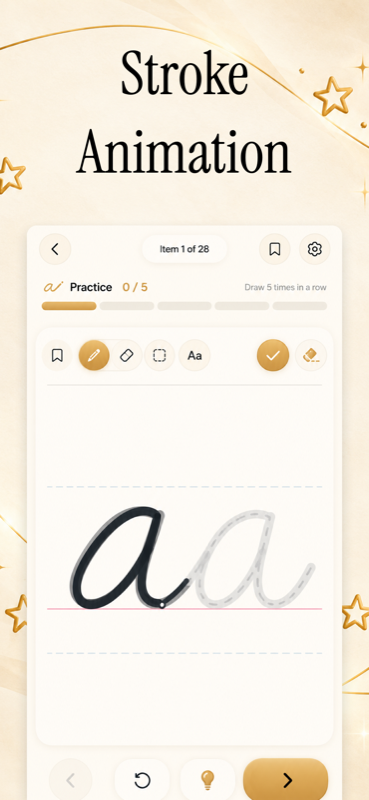
Stroke Animation
Watch each letterform and connector animate stroke-by-stroke before you trace.
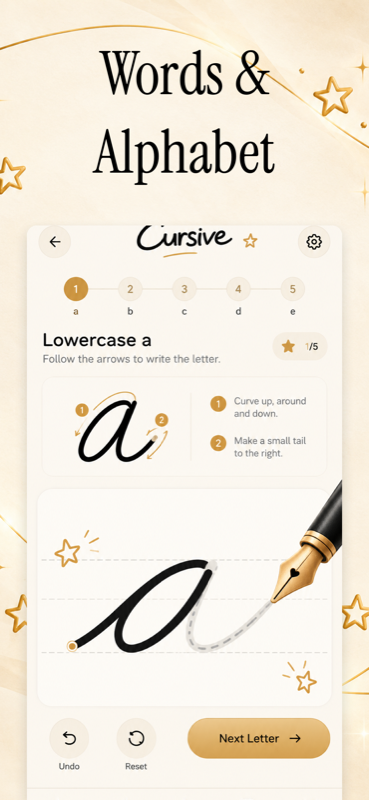
Words & Alphabet
Comprehensive curriculum from basic loops and letters to common words and pangrams.
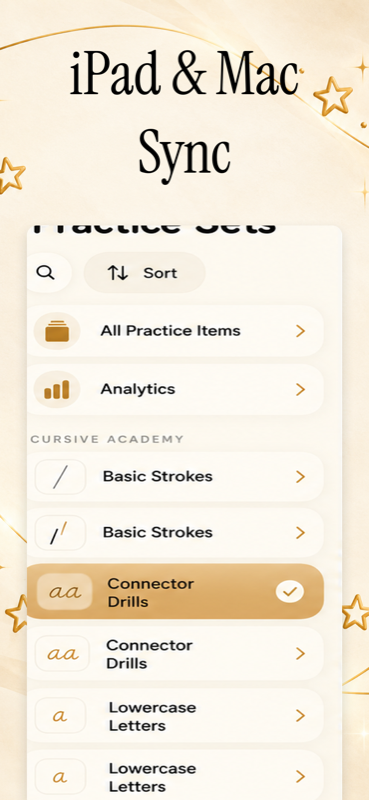
iPad & Mac Sync
Seamless private iCloud sync, full Apple Pencil support, and Mac Catalyst shortcuts.
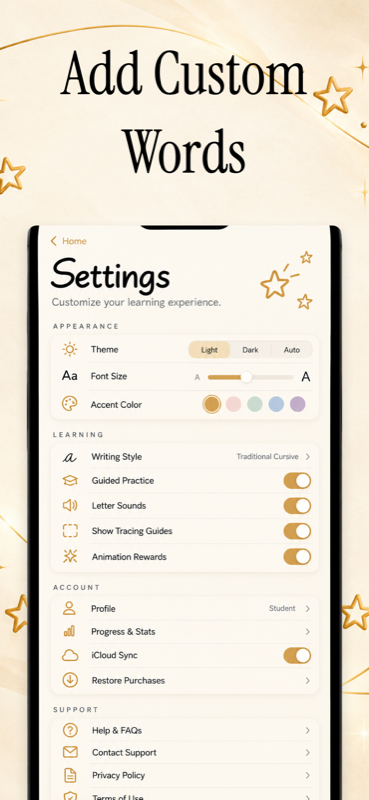
Add Custom Words
Bookmark favorites, practice custom vocabulary, and celebrate streaks and milestone stars.
Letter Home & Opposing Panels
Cursive 4.0 replaces generic navigation bars with a letter-first experience: ruled alphabet cards on Home and dual slide-out panels that keep your practice front and center.
Letter Home
Two columns of real cursive letters on ruled Seyès guidelines with bookmarks and 1-tap practice launch.
My Signature
Dedicated top-level studio in Lessons for typed previews and camera/photo underlay tracing.
Lessons (Left Panel)
Slide-over drawer with curriculum decks, ruled preview cards, and fast metadata search.
Deck Achievements
Progress metrics and celebration stars scoped inside each deck with attributable evidence.
Settings (Right Panel)
Writing preferences, guideline toggles, sound, haptics, theme options, and full backups.
The Cursive Font Studio
Type any word or phrase below to test the authentic cursive styles included in Cursive. Switch fonts, toggle guidelines, and see how letters join.
Interactive Penmanship Dictionary
Search terms, anatomy concepts, and memory science behind Cursive.
Signature Studio
A dedicated practice environment in Version 4.0 offering both typed font previews and photo/camera underlay tracing on Seyès guidelines.
Rejection Smoke Reset
Automated fade-out with a subtle smoke puff that clears unsuccessful traces and undo history, allowing instant retries without manual erase fatigue.
Letter Home
A two-column ruled card deck presenting authentic cursive letters directly on guidelines with individual bookmarks and one-tap practice launches.
Opposing Panels
Dual slide-out panels (Lessons from the left, Settings from the right) that preserve the active Letter Home canvas underneath.
Monoline Canvas
A direct PencilKit rendering path using uniform stroke thickness, eliminating the need for artificial pen tilt or pressure calibration.
Ascender
The portion of a lowercase letter extending above the waistline, as in b, d, h, and l.
Descender
The portion of a letter reaching below the baseline, as in g, j, p, q, and y.
French Seyès
The classic 4-line grid system developed in France, providing exact 2mm vertical and horizontal bounds for letter proportions.
52° Slant
The traditional American penmanship slant angle (Spencerian and Palmer methods), optimizing natural right-handed wrist rotation.
Ligature
The continuous connecting stroke joining one letter to the next without lifting the pen tip from the paper canvas.
Guided Review
Revisiting a previously practiced exercise in the same guided tracing canvas.
Centerline Vector
Mathematical skeletal representation of a letter’s stroke path, allowing precise scoring of trajectory, curvature, and direction.
Motor Consolidation
The neurobiological process of converting conscious, effortful hand movements into automatic, effortless procedural motor memory.
Practice Reviews
Targeted revisit sessions designed to refresh neural motor patterns for letter joins and strokes before muscle memory fades.
Pangram
A sentence containing every letter of the alphabet at least once (e.g., 'The quick brown fox jumps over the lazy dog'), ideal for comprehensive drills.
Classic Snell
An elegant roundhand cursive script based on English 17th-century copperplate writing masters, featuring fluid loops and high contrast.
Entry Stroke
The initial upward lead-in stroke that guides the pen from the baseline into the first body stroke of a cursive character.
Exit Stroke
The upward or forward terminal stroke that concludes a letter and positions the pen to begin the subsequent letter's ligature.
Baseline
The primary horizontal guideline upon which the base of lowercase characters rests. Displayed in rose-pink in Cursive.
Warm Paper
The signature #FBF8F1 canvas tone engineered to mimic high-grade French cotton stationery, reducing eye strain and glare during practice.
A Higher Standard for Penmanship
Compare Cursive with traditional paper tracing and generic handwriting apps.
| Feature & Capability | Cursive | Paper Worksheets | Generic Flashcards | Ad-Supported Apps |
|---|---|---|---|---|
| Centerline Vector Tracing | Sub-pixel 52° Slant | Static ink only | None | Coarse raster path |
| Guided Lesson Review | Saved Practice History | Unstructured | Text-only memory | Fixed repetitions |
| 52° Spencerian & French Seyès Guidelines | Dual Grid Support | If printed | None | Generic lines |
| Apple Pencil & Touch Input | Native Low-Latency | Physical pen only | None | High latency |
| 6 Authentic Font & Handwriting Styles | School to Roundhand | Single style | System font | 1-2 fonts |
| PDF Progress Reports | Built-in Export | Buy booklets | None | Watermarked / None |
| Local-First Privacy & Zero Ads | 100% Private SwiftData | Offline | Cloud login required | Banner & video ads |
| Personal Signature Studio (4.0) | Typed Styles & Camera Underlay | None | None | None |
| Frictionless Rejection Reset | Automatic Smoke Fade & Reset | Manual erase / new sheet | None | Tap erase button |
| Universal Purchase (iPhone, iPad, Mac) | 3 Platforms Included | Physical copies | Web sync | Separate purchases |
Everything You Need to Know
Have questions about Version 4.0.0, signature studio, guided review, or offline practice? Find answers below.
Version 4.0.0 is our biggest release yet. Highlights include: Personal Signature Practice (typed font previews and camera/photo underlay tracing with adjustable scale and opacity), the Letter Home deck with ruled cards directly on guidelines, Opposing Side Panels (Lessons left, Settings right), and a major Drawing Overhaul featuring low-latency monoline PencilKit inking, inline shape replay, and graceful rejection reset with smoke-puff fade.
Tap "My Signature" at the top of the Lessons panel. You can type your name to preview and practice it across all 6 authentic cursive font styles, or snap a photo of your paper signature (or import from Photos/files) to trace over an adjustable underlay on French Seyès guidelines. Photo signature tracing is unscored so you can build authentic muscle memory without artificial algorithmic penalties.
During scored exercises, our centerline engine evaluates your stroke trajectory upon pen-up. If an attempt falls below the accuracy threshold, it gently fades away with a subtle smoke puff and clears native ink and undo history automatically. Coaching hints appear to guide your next try, allowing you to practice in a continuous, uninterrupted flow without having to manually tap an erase button.
Yes, completely. Personal signatures are stored in a dedicated, isolated on-device SwiftData vault with CloudKit disabled and excluded from standard OS backups. You can protect your signature and handwriting library behind Face ID, Touch ID, or your Mac password with App Lock. Signatures never leave your device.
No. Use a finger or compatible touch stylus on iPhone and iPad, or an Apple Pencil compatible with your iPad. On Mac, click and drag with a mouse or trackpad. Ink uses a consistent monoline stroke without pressure or tilt calibration.
Open a lesson and revisit a previously practiced exercise, choose suggested practice, or return to a bookmark. Each writing activity uses the same animated tracing canvas.
Yes. Cursive is 100% local-first. Curriculum lessons and guided tracing run directly on your device without an internet connection. When reconnected, data syncs silently via your private Apple iCloud container.
Six authentic styles are built in: Edu NSW Cursive (standard Australian school script), Classic Snell (traditional roundhand copperplate elegance), Dancing Script (expressive modern flow), Caveat Hand (natural informal monoline), Pacifico (bold brush calligraphy), and Centerline Vector.
Yes. Settings includes lesson export and full backup options. With Full Access, detailed progress also includes PDF reports and CSV data. Custom lesson creation and worksheet generation are not available in this version.
Lessons, guided practice, bookmarks, and basic progress stay free. Detailed history, trace assessments, and progress reports can be sampled during your first 100 completed practice activities; Full Access keeps those features available afterward. Eligible purchases support Family Sharing when shown on the purchase screen.
Rediscover the joy of fluent cursive.
Download Cursive today and transform hesitant scribbles into confident, elegant handwriting on your iPhone, iPad, and Mac.